On Monday I did something I should have done weeks ago: I pulled the price of every product I sell from every place I sell it and put the numbers side by side. Fifteen listings on Etsy, ten on Gumroad, fifteen on my own WooCommerce store. Same files, same titles, three storefronts.
Most of it matched. One line didn’t.
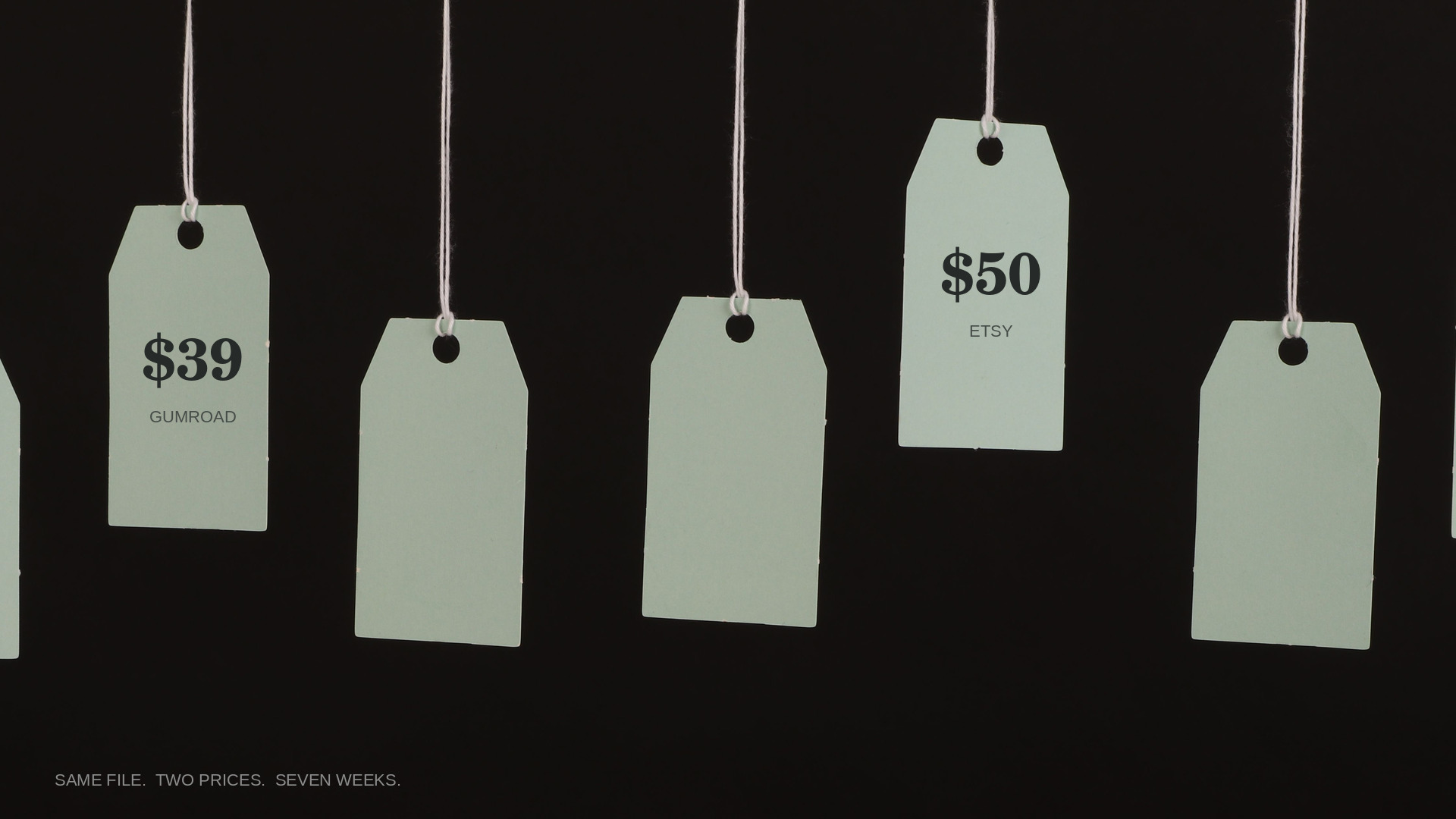
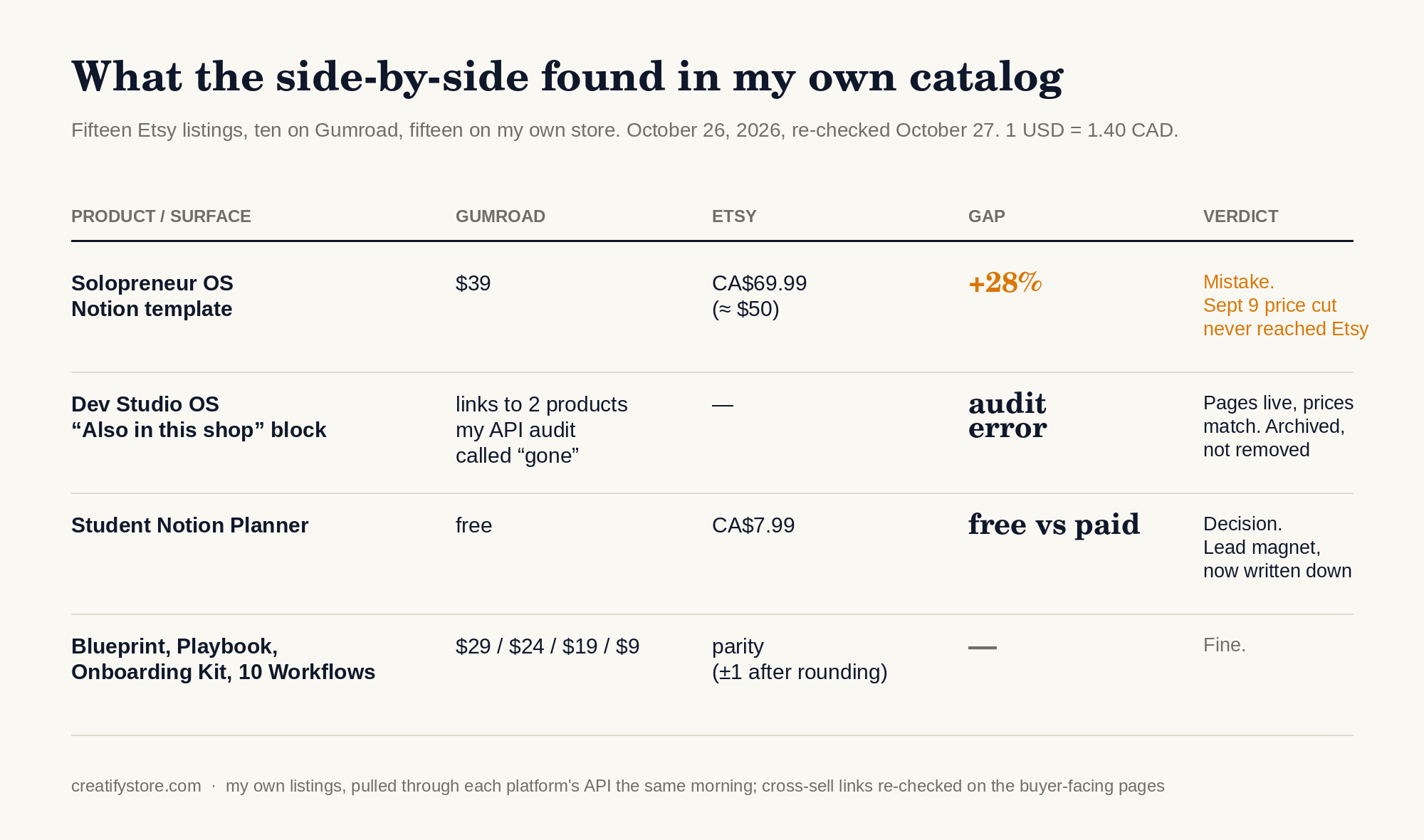
My Solopreneur OS Notion template was $39 on Gumroad and CA$69.99 on Etsy, which at that day’s rate is about $50. Twenty-eight percent more for the identical download. Nobody hacked anything. On September 9 I lowered the Gumroad price from $49.99 to $39 and simply never opened the Etsy listing. Seven weeks of a buyer being able to open two tabs and see me charging two different prices for the same thing.
That’s the story behind this post. The tool at the end exists because I got tired of finding these by accident.
Why offers drift apart (it’s not carelessness, it’s architecture)
An offer never lives in one place. The price is in the listing. The refund window is in the FAQ. The delivery format is in the automated email. “One-time purchase” is in the checkout note. Each of those was written on a different day, often in a different system, and when you change one of them you have to remember all the others.
You won’t. I didn’t, and I run this shop with an unreasonable amount of automation.
The second thing I found turned out to be a finding about my audit, not about my store, and I’m leaving it in because the lesson is better. The Gumroad description of my Dev Studio OS template ends with a friendly “Also in this shop” block. It lists a Minimalist Wall Art Bundle for $12.99 and a Graduation Party Printables kit for $14.99. My audit script, which reads the Gumroad API, reported that neither product existed on Gumroad any more, and the first version of this post said exactly that. A day later I opened the two links the way a buyer would. Both pages were live, both priced as the description promised. The products had been archived, which hides them from the storefront and from the API but leaves the direct page purchasable. So the cross-sell block was fine. The audit was not: it checked a data source instead of the page a buyer sees, and I published its conclusion without clicking. That is the version of this mistake I’d rather you learn from.
There was a third item on the list that I decided to leave alone, and I think that’s worth saying out loud. My Student Notion Planner is free on Gumroad and CA$7.99 on Etsy. That’s deliberate, the free one is the lead magnet, but a buyer can’t know it’s deliberate. Every difference you find falls into one of two buckets: a mistake, or a decision you now have to be able to explain. Both deserve a look. Only one needs a fix.
This stopped being a tidiness issue in 2026
Two platforms I sell on rewrote their rules this year, and both of them now say, in plain words, that the copy has to match the offer.
Gumroad’s Terms of Service, last updated September 14, 2026, list it as prohibited conduct when a seller “materially obscures or misstates the price, currency, total amount charged, recurring nature” of a product (section 14, item xvii). The item right before it bans advertising “reference or ‘compare-at’ prices at which a Product was not genuinely offered.” And item xviii is the one that caught my attention: those rules apply to any content that promotes the product, including pages and channels you control yourself. Your own FAQ counts. Your own blog counts.
Etsy’s Seller Policy, updated October 5, 2026, is shorter about it: “It’s important that you, your items and your shop are honestly and accurately represented,” followed by a list that starts with “Accurately represent your items.”
Neither platform is going to suspend a shop over a stale cross-sell paragraph. But a buyer who paid $50 and then finds the $39 page has a legitimate complaint, and “I forgot to update Etsy” is not a defence I want to type into a dispute form.
A worked example, so the mechanics are clear
The real cases above are messy. Here is a clean, invented one. Say a digital planner is described in two places:
| Channel | Published wording |
|---|---|
| Store listing | “USD 19.00 one-time purchase. 30-day refund. PDF download.” |
| FAQ | “USD 24.00 one-time purchase. Refund within 14 days. PDF download.” |
The format agrees. The price and the refund period don’t. That alone is enough to pause a launch, even though the text can’t tell you why they differ. Maybe one page describes a promotion. Maybe one is a different tier. Maybe it’s just old. You resolve the context first and only then change a page, because fixing the wrong one is worse than fixing neither.
What I actually compare now
I keep this as a short list and run it before any price change, any policy change, and any launch. Copy the exact sentences from each page; a summary will hide the one qualifier that matters.
- Price, same currency. Two channels, two amounts? First check whether they describe the same tier, the same tax treatment, or a promotion that’s still running. Then decide which one is the truth.
- Reference prices. If a page shows a crossed-out “was” price, was the product genuinely sold at that price? Gumroad now asks this explicitly.
- Refund window. 30 days on one page, 14 on another, “digital, no refunds” on a third. Which one applies to the current product and purchase date?
- Billing model. “One-time” on the listing, “subscription” somewhere in an old email. Confirm against the live checkout, not against the copy.
- Delivery format. ZIP, PDF, Notion link, Google Sheet. Mentions can be complementary rather than contradictory, so this is a read, not a verdict. Open the actual file the buyer gets.
- Cross-sells and “also in this shop”. Every product named still exists at that price on that platform? Check by opening the link as a buyer would, not by querying an API. Archived products disappear from one and not the other, which is how I misreported my own Dev Studio description in the first version of this post.
- Deliberate differences. Free here, paid there, cheaper on the platform with lower fees. Write down the reason. If you can’t, it’s not a decision, it’s drift.
- Dates and versions. “Updated for 2026”, “v2.0 included”. Still true after the last file change?
The final call stays with a person who can open the real checkout and download the real file. Text comparison is a review aid. It’s not proof of what a buyer receives.
The repeatable version (an Apify actor)
Doing step one by hand across 40 listings took me most of an afternoon, so I built a small tool for the narrow part that is mechanical: Cross-Channel Offer Consistency Audit on Apify.
You paste English copy from two to eight channels, give each a label, and run one comparison. It lists possible differences in explicit same-currency prices, refund windows, and access wording, each with the source labels and the verbatim quotes that triggered the flag. File-format mentions come out as a separate list for manual review, because “PDF” in one place and “ZIP with a PDF inside” in another is not a contradiction.
On the invented example above it reports two conflicts, price and refund period, and lists the shared PDF mention as evidence rather than a mismatch. It deliberately refuses to call a price conflict when a source lists several prices or the currency is ambiguous, because a false alarm costs you more trust in the tool than a miss does.
What it does not do, and I’d rather say this myself than have you find out: it doesn’t visit live pages, inspect files, test a checkout, apply any marketplace’s rules, or produce anything resembling a legal opinion. Paste only copy you’re allowed to process, and leave customer details out. Pricing is on the Apify page and may change, so check it there rather than trusting a number in a blog post. That last sentence is, I suppose, the whole point of the article.
What I changed after the audit
The Etsy price goes to parity this week, after a sale I’m running ends, so the discount is calculated from a clean base. The Dev Studio cross-sell block stays as it is; the audit script now opens each buyer-facing page instead of trusting the API list. The free-versus-paid planner stays as it is, now with a one-line note in my own records explaining why. And the comparison runs again after each change, against the final copy, before I look at the live buyer path.
The useful output is never a verdict. It’s a short, quotable list of sentences that disagree with each other, and a person deciding which one is true.
Correction, October 27: the first version of this post said the two products in the Dev Studio cross-sell block had left Gumroad. They had been archived, not removed, and both pages were live at the stated prices. The second finding and the table were rewritten accordingly.
Related: I Automated My Business, Then Audited It. The $12.99 Sale Never Happened and How I Check Whether AI Crawlers Can Reach a Website.
Sources
- Gumroad Terms of Service, section 14 (last updated September 14, 2026)
- Etsy Seller Policy (last updated October 5, 2026)
- Cross-Channel Offer Consistency Audit on Apify
📚 Related Articles
- How I Built an AI Blog Engine That Writes SEO Content on Autopilot
- How to Price a Notion Template on Etsy vs Gumroad Without the Two Drifting Apart
- RAG Pipelines 50x Slower: 3 Architectural Fixes
- Social Media Templates for Conversion & AI Content
Get the free AI Automation Starter Kit
Ready-to-use workflows and prompts I actually run in a live, 24/7 AI-automated business — no fluff, instant access.
🚀 Level Up Your AI Game
Get weekly AI tools, prompts & automation strategies — free, every week.
No spam. Unsubscribe anytime.