
By Andrii Klymenko · Updated October 14, 2026
Quick answer: I do not treat a robots.txt rule as proof that a crawler is blocked or allowed. I check the policy file, send a bounded request with a named requester profile, record the actual HTTP response, and then inspect the returned HTML for indexing and canonical signals. Those observations still do not prove that a provider will crawl, index, cite, train on, or exclude the page. They simply replace assumptions with a reproducible record.
Why I built a separate check
I kept running into the same problem while reviewing small business websites. A robots.txt file looked reasonable, but nobody had recorded what the server actually returned when a request arrived with a particular crawler label. Sometimes the request redirected. Sometimes a security layer returned a different status. Sometimes the page loaded but carried a noindex directive or a canonical reference to another URL.
These are different questions, and collapsing them into a single “allowed” or “blocked” badge creates false confidence. I wanted a small tool that kept the evidence separate: published policy, observed response, and page-level signals.
My five-minute baseline
Before I touch a firewall rule or edit a robots.txt file, I record four things:
- The exact public URL. I use the canonical HTTPS address and avoid login pages, query strings, and private endpoints.
- The robots.txt response. I check the status code, content type, and rules that apply to the requester label I am testing.
- The page response. I record the initial status, final URL after redirects, elapsed time, and any request error.
- The HTML signals. I look for the title, H1 count, meta robots directive, canonical reference, structured-data count, and a rough visible-text estimate.
This baseline is intentionally modest. It does not execute page JavaScript, impersonate a verified provider network, or bypass an access control. That restraint is useful: the result is easier to explain, repeat, and hand to a developer.
Robots.txt is a policy signal, not a firewall
A robots.txt file tells compliant crawlers which paths the site owner would prefer them not to fetch. It is not authentication, and it is not enforcement. A requester can ignore it. A CDN or web application firewall can also make a different decision before the application ever sees the request.
This is why I keep the robots interpretation and the HTTP observation in separate fields. If the policy says “allow” but the server returns 403, the practical result is still a failed request. If the policy says “disallow” but the server returns 200, the page is technically reachable even though a compliant crawler should respect the published rule.
What an observed response can and cannot tell you
A response code is evidence about one request at one moment. A 200 response means the server returned content to that request. A redirect shows where the request ended. A 401 or 403 indicates an authentication or access decision. A timeout records that the request did not complete inside the allowed window.
None of those results proves future indexing or AI visibility. Search and AI systems apply their own scheduling, quality, policy, and retrieval decisions after access. Provider infrastructure may also use IP ranges and request patterns that a simulation cannot reproduce.
I use the result as a diagnostic artifact, not as a promise. It is most valuable when two people need to discuss the same evidence: a site owner and a developer, an agency and a client, or an SEO specialist and a security team.
The page-level signals I check next
Once the server returns HTML, I check whether the document is internally coherent:
- Does the title describe the page?
- Is there one clear primary heading?
- Does a meta robots directive restrict indexing?
- Does the canonical reference point to the URL being reviewed?
- Is structured data present, and does it match the visible page?
- Is there enough readable text for the page to communicate its purpose?
These checks are not a ranking score. They are a compact way to find contradictions. A public product page with a noindex directive, a canonical pointing elsewhere, or an unexpected redirect deserves investigation before anyone spends money driving traffic to it.
A practical example
Imagine a software product page that appears normal in a browser. Its robots.txt file does not block a named requester. A test request receives 200 OK, but the final URL is a generic storefront page and the HTML canonical points to that storefront rather than the product.
The problem is not “AI crawler access.” The problem is URL resolution and canonicalization. Changing crawler rules would not fix it. The recorded chain helps the developer work on the right layer.
Now consider the reverse: robots.txt disallows a requester, but the page still returns 200. That is not necessarily an error. Robots.txt is advisory. The important question is whether the published policy reflects the owner’s intent and whether additional enforcement is actually required.
The checklist I use before changing anything
- Confirm that I own the site or have permission to test it.
- Use public HTTPS pages only.
- Record the current robots.txt and page responses.
- Separate policy interpretation from actual HTTP behavior.
- Review redirects, indexing directives, and canonical references.
- Save the evidence before changing configuration.
- Repeat the same bounded check after the change.
- Keep the before-and-after exports with the deployment notes.
This process is deliberately boring. That is a compliment. Website access decisions should be reviewable, not theatrical.
The hosted diagnostic I use
I packaged this workflow as Crawl Access Diagnostic. It checks 1–25 authorized public HTTPS pages on one hostname, keeps a private license-gated history, and exports the observations as JSON, CSV, or TXT.
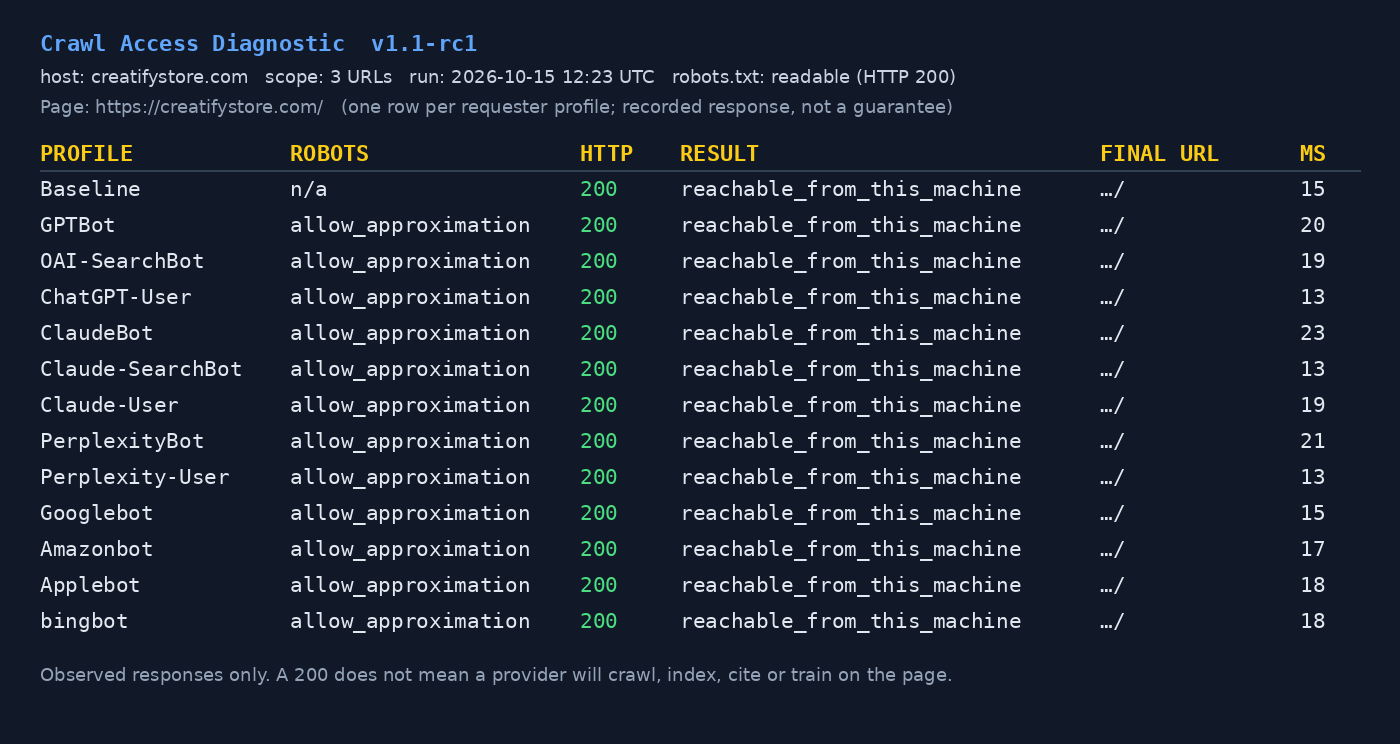
The service uses simulated User-Agent labels from its own hosting connection. It does not reproduce verified provider IPs, execute page JavaScript, bypass CAPTCHAs or paywalls, or modify a website. Results are scheduled for deletion after seven days, so I download anything I need to retain.
For website owners, developers, and small agencies: view the full access terms and purchase 12 months of hosted access on Gumroad.
Frequently asked questions
Does a 200 response mean an AI system will use my page?
No. It only means the tested request received a successful HTTP response. Crawling, indexing, citation, training, and exclusion are separate provider decisions.
Can this prove that robots.txt is being respected?
It can record the published rules and the response observed during a simulated request. It cannot prove how every provider will behave from its own infrastructure.
Should I block every AI-related requester?
Not automatically. Training crawlers, retrieval agents, search crawlers, and user-triggered fetchers may serve different purposes. Decide what outcome you want, then write and test rules that match that decision.
Is it safe to test a client website?
Only with the owner’s permission. Keep the run bounded, use public pages, avoid sensitive URLs, and retain the exports as part of the change record.
Andrii Klymenko builds practical automation and diagnostic tools at CreatifyStore. This article documents his testing method and the boundaries he applies when interpreting crawler-access results.
📚 Related Articles
- Robots.txt: Block 99% of AI Crawlers – Guide
- AI Crawlers: 5 Hidden Facts Nobody Tells You
- I Tested 30 Major Websites: 1 in 5 Does Not Serve the AI Crawlers It Officially Allows
- I Built a Fully Autonomous AI Business. 111 Days, 149 Articles and 63 Cron Jobs Later, It Made $54.
Get the free AI Automation Starter Kit
Ready-to-use workflows and prompts I actually run in a live, 24/7 AI-automated business — no fluff, instant access.
Grab it free →🚀 Level Up Your AI Game
Get weekly AI tools, prompts & automation strategies — free, every week.
No spam. Unsubscribe anytime.